Chilly Winds Don't Blow
Not Fancy, Just Good
Solid MP3 Player

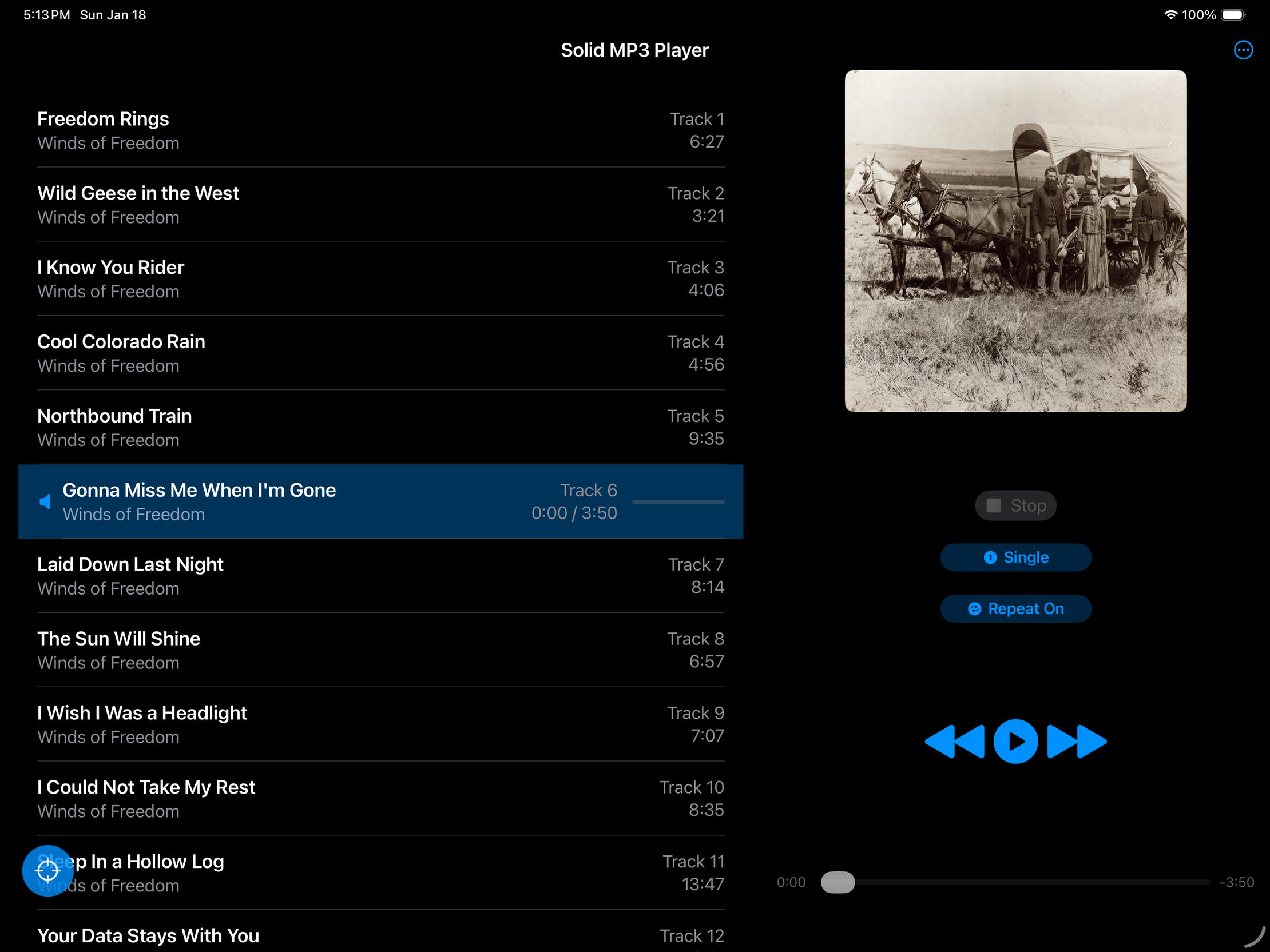
A simple, offline MP3 player for iPad
Built for people who just want to listen to their own music—no accounts, no streaming, no internet required. Load your MP3s, pick one or more albums, and press play. Simple controls, clean interface, and nothing else getting in the way.
The app is lean and efficient—small memory footprint, easy on your battery. And there's no upgrade nagging: what you buy is what you get, no locked features, no subscriptions.
Built purely as an iPad app - works in all orientations.
Solid MP3 Player Privacy Policy
Last Updated: January 20, 2026Chilly Winds Don't Blow, LLC built the Solid MP3 Player app as a Commercial app. This service is provided by Chilly Winds Don't Blow, LLC and is intended for use as is.1. Personal Data Collection
We believe that your data belongs to you.Zero Data Collection: We do not collect, store, or transmit any personal information, including your name, email address, location, or device identifiers.No Account Required: You do not need to create an account or sign in to use the app.2. Audio Files and the iPad File Picker
Our app is an offline MP3 player.Local Access Only: The app uses the standard iOS/iPadOS File Picker to allow you to select your own MP3 files stored on your device or iCloud Drive.No Uploading: Your files stay on your device. We do not upload your music or any metadata about your music to any servers.
3. Internet Connectivity and Third Parties
Offline by Design: This app does not connect to the internet.No Analytics or Tracking: We do not use third-party tracking tools (like Google Analytics or Flurry) and we do not display advertisements.No In-App Purchases: We will never "bug" you to upgrade or purchase additional features via in-app prompts.4. Children's Privacy
Because we do not collect any data, our app is safe for users of all ages and is fully compliant with the Children’s Online Privacy Protection Act (COPPA).5. Contact Us
If you have any questions about this Privacy Policy, you can contact us at: [email protected]
Email: [email protected]
How to access your MP3 files
• USB Drive (Easy Method) Plug your drive containing your mp3 files into your iPad. You can select and play songs directly from the drive using the app's file picker. Note: The drive must remain plugged in while playing.
• External & Network Storage You can select songs from wireless network drives or cloud servers. These work well, though initial loading depends on your network speed and stability.
• Permanent Storage To keep your music on the iPad permanently, use the iPad Files app to copy folders from your USB drive into the "On My iPad" folder.
• For further assistance, consult Apple’s help pages linked below.
Solid FLAC to MP3 Converter

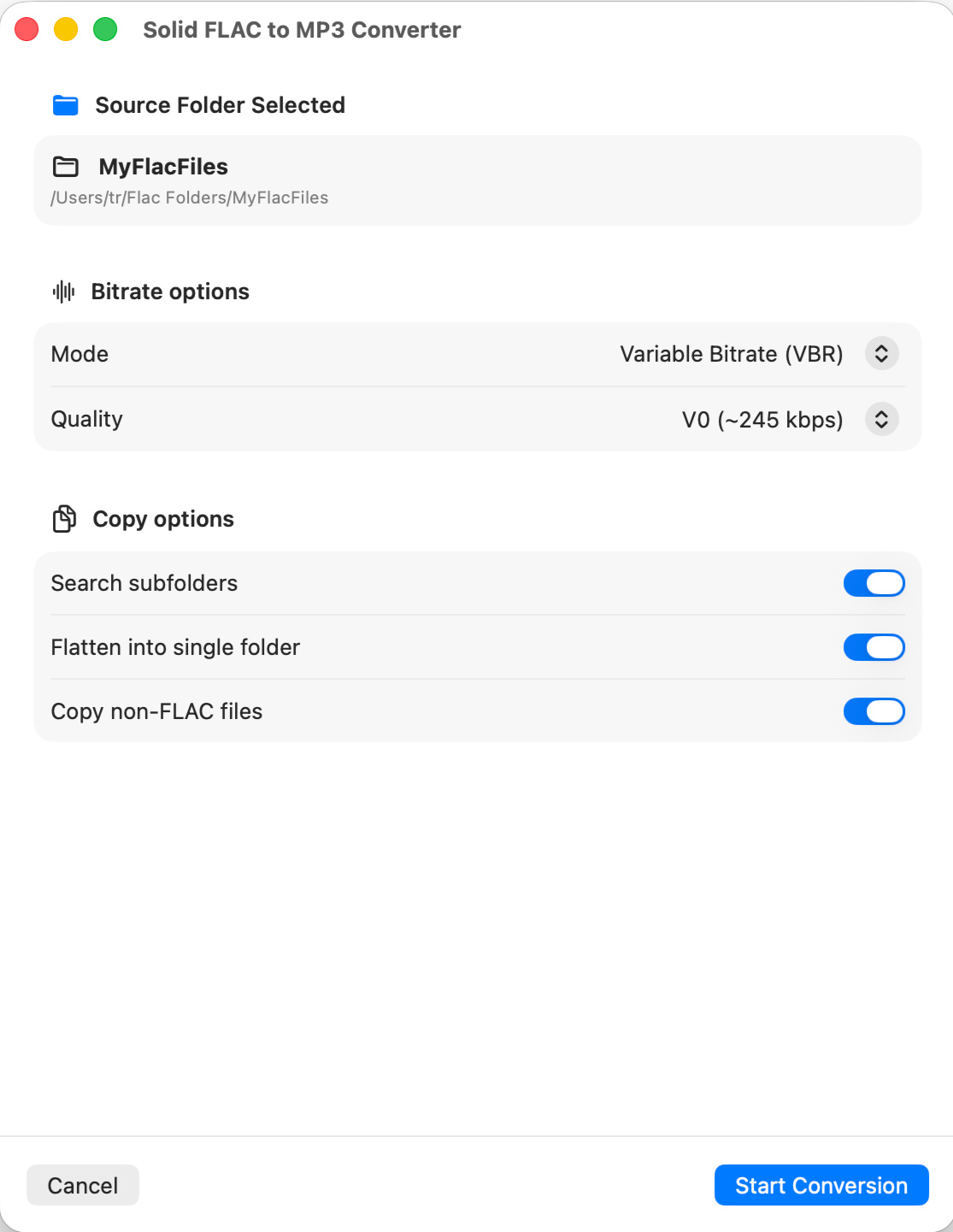
A simple Flac to MP3 converter for macOS
Turns folders of FLAC files into MP3s. Point it at a folder, pick where the MP3s go, choose your settings, and the app does the rest. Your original files are never touched.
Handles nested folders recursively. Mirror your folder structure in the output, or flatten everything into a single folder. Metadata is preserved, and album art is carried over from the FLAC or from a folder image when available.
Choose from a range of MP3 bitrates in either constant (CBR) or variable (VBR) mode. Pause a conversion if you need the CPU, resume when you're ready. Cancel cleans up after itself.
Native support for both Apple Silicon and Intel. No internet required. No ads, no tracking, no subscriptions, no in-app purchases. Buy it once, own it.
Solid FLAC to MP3 Converter Privacy Policy
Last Updated: May 5, 2026
Chilly Winds Don't Blow, LLC built the Solid FLAC to MP3 Converter app as a Commercial app. This service is provided by Chilly Winds Don't Blow, LLC and is intended for use as is.
1. Personal Data Collection
We believe that your data belongs to you.
Zero Data Collection: We do not collect, store, or transmit any personal information, including your name, email address, location, or device identifiers.
No Account Required: You do not need to create an account or sign in to use the app.
2. Audio Files and File Access
Our app is an offline FLAC-to-MP3 converter.
Local Access Only: The app uses standard macOS file pickers to allow you to select FLAC files stored on your desktop or external storage.
No Uploading: Your files stay on your device. We do not upload your music or any metadata about your music to any servers.
3. Internet Connectivity and Third Parties
Offline by Design: This app does not connect to the internet.
No Analytics or Tracking: We do not use third-party tracking tools (like Google Analytics or Flurry) and we do not display advertisements.
No In-App Purchases: We will never "bug" you to upgrade or purchase additional features via in-app prompts.
4. Children's Privacy
Because we do not collect any data, our app is safe for users of all ages and is fully compliant with the Children's Online Privacy Protection Act (COPPA).
5. Contact Us
If you have any questions about this Privacy Policy, you can contact us at: [email protected]
Solid FLAC to MP3 Converter Support
For questions, bug reports, or feedback about Solid FLAC to MP3 Converter, please get in touch at the email address below.Email: [email protected]I'll respond as quickly as I can.
Solid MP3 Player Desktop

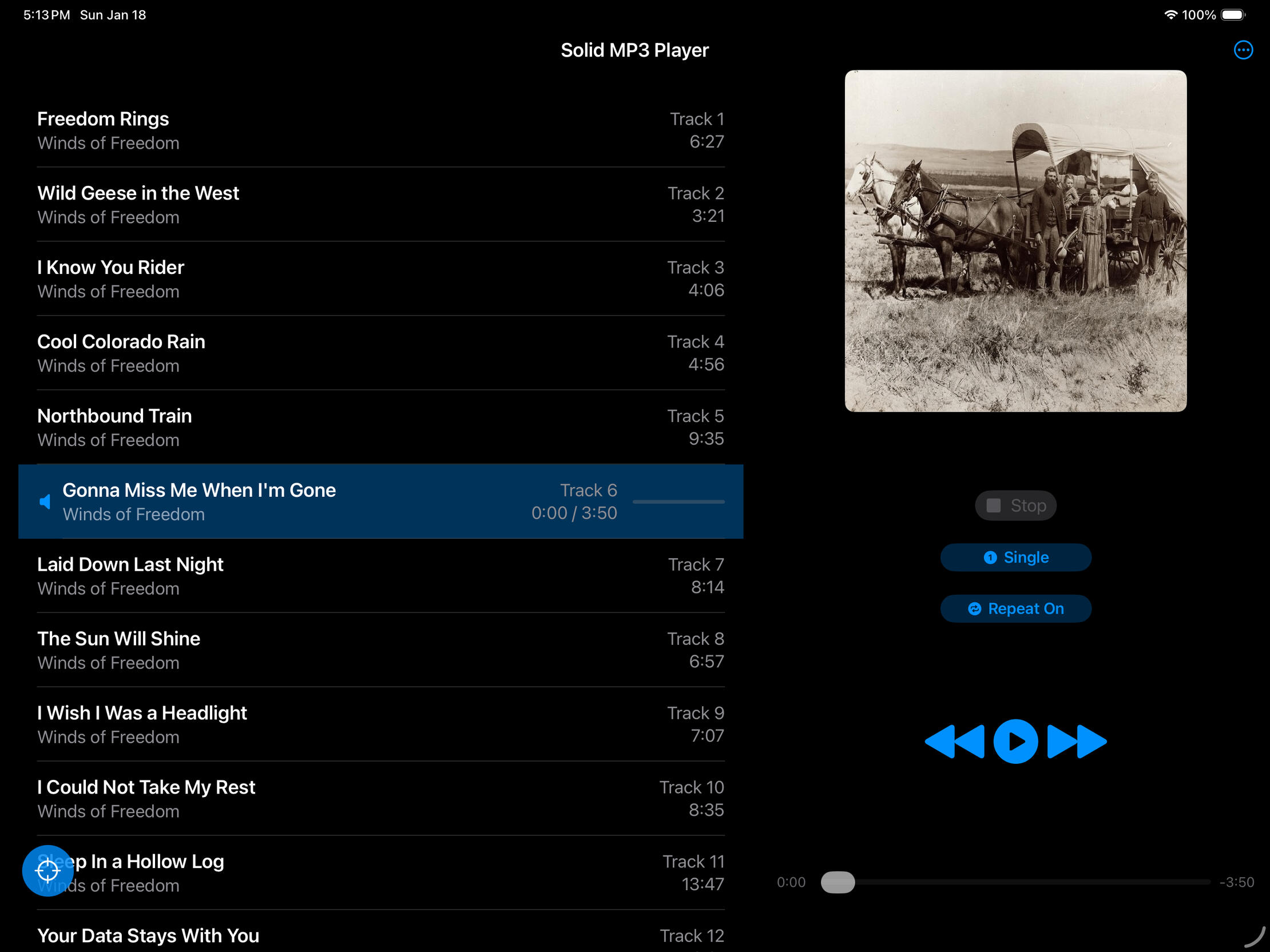
A simple, offline MP3 player for macOS
Built for people who just want to listen to their own music—no accounts, no streaming, no internet required. Load your MP3s, pick one or more albums, and press play. Simple controls, clean interface, and nothing else getting in the way.
The app is lean and efficient—small memory footprint, easy on your battery. And there's no upgrade nagging: what you buy is what you get, no locked features, no subscriptions.
Solid MP3 Player Desktop Privacy Policy
Last Updated: May 16, 2026Chilly Winds Don't Blow, LLC built the Solid MP3 Player Desktop app as a Commercial app. This service is provided by Chilly Winds Don't Blow, LLC and is intended for use as is.1. Personal Data Collection
We believe that your data belongs to you.Zero Data Collection: We do not collect, store, or transmit any personal information, including your name, email address, location, or device identifiers.No Account Required: You do not need to create an account or sign in to use the app.2. Audio Files and the iPad File Picker
Our app is an offline MP3 player.Local Access Only: The app uses standard macOS file pickers and drag-and-drop to allow you to select your own MP3 files stored on your Mac, external drives, or iCloud Drive.No Uploading: Your files stay on your device. We do not upload your music or any metadata about your music to any servers.
3. Internet Connectivity and Third Parties
Offline by Design: This app does not connect to the internet.No Analytics or Tracking: We do not use third-party tracking tools (like Google Analytics or Flurry) and we do not display advertisements.No In-App Purchases: We will never "bug" you to upgrade or purchase additional features via in-app prompts.4. Children's Privacy
Because we do not collect any data, our app is safe for users of all ages and is fully compliant with the Children’s Online Privacy Protection Act (COPPA).5. Contact Us
If you have any questions about this Privacy Policy, you can contact us at: [email protected]
Solid MP3 Player Desktop Support
For questions, bug reports, or feedback about Solid MP3 Player Desktop, please get in touch at the email address below.Email: [email protected]I'll respond as quickly as I can.
Solid FLAC Player Desktop

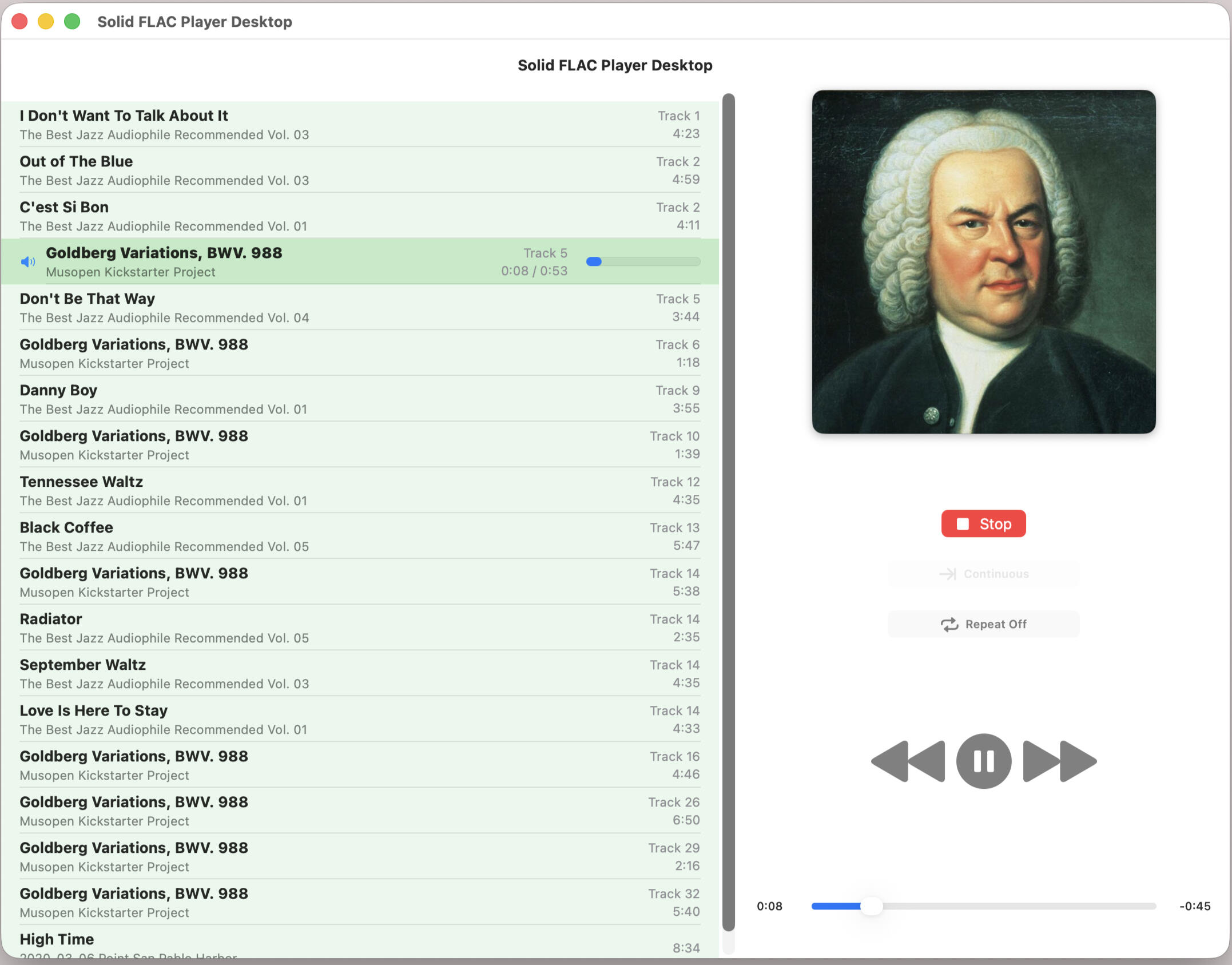
A simple, offline FLAC player for macOS
Built for people who just want to listen to their own music—no accounts, no streaming, no internet required. Load your FLACs, pick one or more albums, and press play. Simple controls, clean interface, and nothing else getting in the way.
The app is lean and efficient—small memory footprint, easy on your battery. And there's no upgrade nagging: what you buy is what you get, no locked features, no subscriptions.
Solid FLAC Player Desktop Privacy Policy
Last Updated: June 03, 2026Chilly Winds Don't Blow, LLC built the Solid FLAC Player Desktop app as a Commercial app. This service is provided by Chilly Winds Don't Blow, LLC and is intended for use as is.1. Personal Data Collection
We believe that your data belongs to you.Zero Data Collection: We do not collect, store, or transmit any personal information, including your name, email address, location, or device identifiers.No Account Required: You do not need to create an account or sign in to use the app.2. Audio Files and the iPad File Picker
Our app is an offline FLAC player.Local Access Only: The app uses standard macOS file pickers and drag-and-drop to allow you to select your own FLAC files stored on your Mac, external drives, or iCloud Drive.No Uploading: Your files stay on your device. We do not upload your music or any metadata about your music to any servers.
3. Internet Connectivity and Third Parties
Offline by Design: This app does not connect to the internet.No Analytics or Tracking: We do not use third-party tracking tools (like Google Analytics or Flurry) and we do not display advertisements.No In-App Purchases: We will never "bug" you to upgrade or purchase additional features via in-app prompts.4. Children's Privacy
Because we do not collect any data, our app is safe for users of all ages and is fully compliant with the Children’s Online Privacy Protection Act (COPPA).5. Contact Us
If you have any questions about this Privacy Policy, you can contact us at: [email protected]
Solid FLAC Player Desktop Support
For questions, bug reports, or feedback about Solid FLAC Player Desktop, please get in touch at the email address below.Email: [email protected]I'll respond as quickly as I can.
Solid FLAC Player

A simple, offline FLAC player for iPad
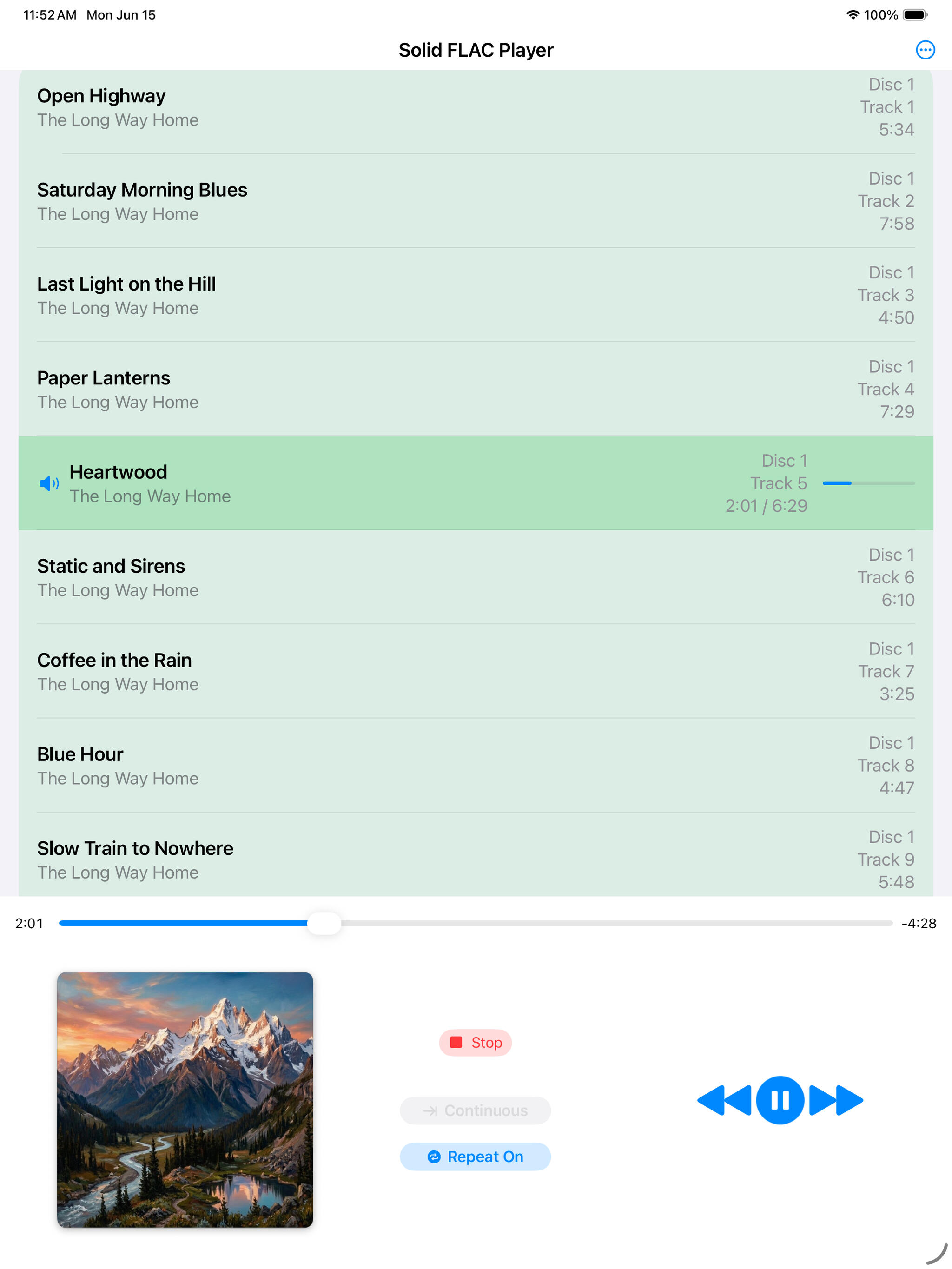
Built for people who just want to listen to their own music—no accounts, no streaming, no internet required. Load your FLACs, pick one or more albums, and press play. Simple controls, clean interface, and nothing else getting in the way.
The app is lean and efficient—small memory footprint, easy on your battery. And there's no upgrade nagging: what you buy is what you get, no locked features, no subscriptions.
Built purely as an iPad app - works in all orientations.
Solid FLAC Player Privacy Policy
Last Updated: June 15, 2026Chilly Winds Don't Blow, LLC built the Solid FLAC Player app as a Commercial app. This service is provided by Chilly Winds Don't Blow, LLC and is intended for use as is.1. Personal Data Collection
We believe that your data belongs to you.Zero Data Collection: We do not collect, store, or transmit any personal information, including your name, email address, location, or device identifiers.No Account Required: You do not need to create an account or sign in to use the app.2. Audio Files and the iPad File Picker
Our app is an offline FLAC player.Local Access Only: The app uses the standard iOS/iPadOS File Picker to allow you to select your own FLAC files stored on your device or iCloud Drive.No Uploading: Your files stay on your device. We do not upload your music or any metadata about your music to any servers.
3. Internet Connectivity and Third Parties
Offline by Design: This app does not connect to the internet.No Analytics or Tracking: We do not use third-party tracking tools (like Google Analytics or Flurry) and we do not display advertisements.No In-App Purchases: We will never "bug" you to upgrade or purchase additional features via in-app prompts.4. Children's Privacy
Because we do not collect any data, our app is safe for users of all ages and is fully compliant with the Children’s Online Privacy Protection Act (COPPA).5. Contact Us
If you have any questions about this Privacy Policy, you can contact us at: [email protected]
Email: [email protected]
How to access your FLAC files
• USB Drive (Easy Method) Plug your drive containing your FLAC files into your iPad. You can select and play songs directly from the drive using the app's file picker. Note: The drive must remain plugged in while playing.
• External & Network Storage You can select songs from wireless network drives or cloud servers. These work well, though initial loading depends on your network speed and stability.
• Permanent Storage To keep your music on the iPad permanently, use the iPad Files app to copy folders from your USB drive into the "On My iPad" folder.
• For further assistance, consult Apple’s help pages linked below.
Solid MP3 Alphabetizer

Play your songs in track order
Some music players sort songs alphabetically instead of by track number, so tracks come out scrambled. Solid MP3 Alphabetizer fixes this by prefixing a track number onto each MP3's file name and title, so any alphabetical player plays them in order. It's preview-first: point it at a folder and see exactly what will change before anything is written—nothing touches your files until you review and commit, and you can revert any time before closing the folder. No accounts, no tracking, no internet, no subscriptions. What you buy is what you get.
Built purely as an iPad app - works in all orientations.
Solid MP3 Alphabetizer Privacy Policy
Last Updated: July 17, 2026Chilly Winds Don't Blow, LLC built the Solid MP3 Alphabetizer app as a Commercial app. This service is provided by Chilly Winds Don't Blow, LLC and is intended for use as is.1. Personal Data Collection
We believe that your data belongs to you.Zero Data Collection: We do not collect, store, or transmit any personal information, including your name, email address, location, or device identifiers.No Account Required: You do not need to create an account or sign in to use the app.2. Audio Files and the macOS File Picker
Our app is an offline MP3 tag writer.Local Access Only: The app uses the standard macOS folder picker or dropper to allow you to select your own MP3 files stored on your device.No Uploading: Your files stay on your device. We do not upload your music or any metadata about your music to any servers.
3. Internet Connectivity and Third Parties
Offline by Design: This app does not connect to the internet.No Analytics or Tracking: We do not use third-party tracking tools (like Google Analytics or Flurry) and we do not display advertisements.No In-App Purchases: We will never "bug" you to upgrade or purchase additional features via in-app prompts.No Social Media Integration: This app does not include social media features, buttons, or share extensions, and does not connect to any social media platform.4. Children's Privacy
Because we do not collect any data, our app is safe for users of all ages and is fully compliant with the Children’s Online Privacy Protection Act (COPPA).5. Contact Us
If you have any questions about this Privacy Policy, you can contact us at: [email protected]
Solid MP3 Alphabetizer Support
Getting Started
Solid MP3 Alphabetizer fixes albums that play out of order. Some MP3 players ignore track-number tags and sort songs alphabetically — some by file name, some by title — so tracks come out scrambled. This app puts the track number at the front of the file name and/or title ("Long Way Home" becomes "03 Long Way Home"), so alphabetical order and album order become the same thing.
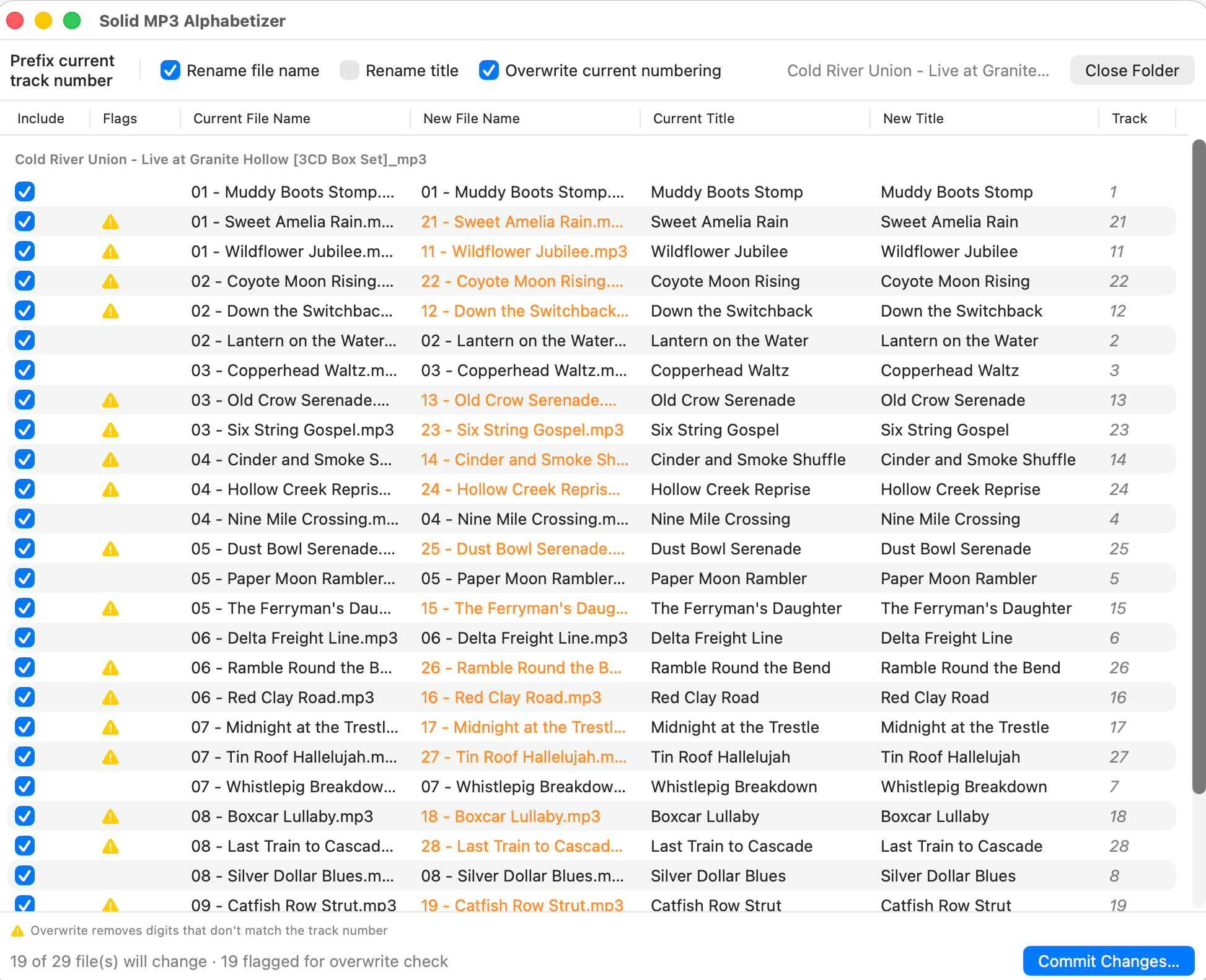
Nothing changes until you say so. The app shows every proposed change first, with new names in orange, and you review and adjust before committing.How to use it
Drop a folder of MP3s onto the window, or choose one with the button. Every MP3 in the folder and its subfolders is listed, grouped by folder.
Check "Rename file name," "Rename title," or both. The New columns show what each file would become; anything changing appears in orange.
Click "Commit Changes" when the preview looks right. You'll be asked to confirm.
Changed your mind? "Revert Last Commit" puts names and titles back, one commit at a time, until you close the folder.Where the number comes from
The number is read from each file's existing track-number tag — the app never guesses an order, and files with no track number are never changed. Track numbers themselves are only read, never altered.
Numbers are zero-padded so alphabetical sorting works: enough digits for the largest track in that folder, minimum two. If a folder's highest track is 23, track 7 becomes "07"; if the highest is 145, it becomes "007". Each folder is padded on its own.Overwrite Current Numbering
With this on, a name or title that already starts with digits and a space has that old number replaced instead of stacking a second one in front — "08 Long Way Home" at track 3 becomes "03 Long Way Home," not "03 08 Long Way Home." Only a leading number and single space are replaced; a name like "03 - Chinatown Shuffle" keeps its style.
Watch for the yellow warning triangle: it appears when the digits being removed don't match the track number. Usually that's the fix you want — but check the row, since a song legitimately named "99 Luftballons" would lose its "99." Uncheck any row to leave it alone.Committing and reverting
Committing renames files and rewrites title tags on disk. You can revert until you close the folder — after that, changes are permanent, which is why the app confirms first. If a file can't be changed (locked, or a drive disconnected mid-run), the commit continues with the rest and shows a report of what failed and why.
As with any tool that changes files, it's good practice to keep backups of anything important. A quick copy of your folder in Finder beforehand covers the rare cases outside any app's control, like a power loss at the wrong moment.Privacy
The app collects nothing — no ads, no tracking, no analytics, no network access. Your files are read and changed on your Mac and never go anywhere else.
For questions, bug reports, or feedback about Solid MP3 Alphabetizer, please get in touch at the email address below.Email: [email protected]I'll respond as quickly as I can.